
Contents
Which table should you pick?
Pipeline will create a minimum of 3 tables:
- Sessions
- Clients
- Pageviews
Which should you use?
The 5 second answer is:
Use the sessions table.
You probably want this one. Particularly if you were used to Universal Analytics.
The longer answer is:
Pick the scope you want to work with and pick the table for that scope.
We'll spend the rest of this post explaining that.
Why does it matter?
You can't put any metric with any dimension.
This isn't just a Pipeline thing, it's an analytics thing, it's a GA4 thing. Many people get this wrong, report on the wrong numbers and never even realise.
Let's get into it.
How did we decide to work with scope?
Well with Pipeline GA4, we made one table per scope.
So we have:
- User table - User ID scope.
- Client table - Pseudo user/client scope.
- Session table - Session scope.
- Pageview Table - Hit scope.
- Items Table - Item scope.
The basics of selecting the right table are pretty simple.
How do you pick a table?
Pick the question you're interested in:
Do you want to know:
- Where do your users come from? > User Scope
- Where do your sessions come from > Session Scope
- Which page gets the most visits from a country > Hit scope
It then gets a bit more fiddly when you want to combine both in one table. I.e. suppose you want sessions & users in one table.
That's usually where the problems start.
90% of the mistake we see are putting user metrics with session dimensions.
Here's our cheat sheet for what metrics you can pair with dimensions:
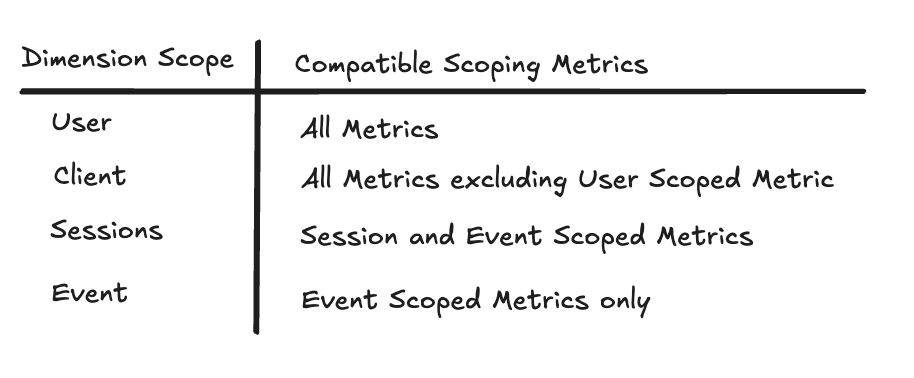
Let's explore that a bit more.
What is scope?
Scope in GA4 is the level of grouping we apply to our analytics e.g.
- Session
- User
- Hit
It’s easier to understand by thinking about the goal we're trying to achieve.
When you open up your analytics you might look for different things:
- I want to know how my users are behaving
- I want to know how each individual session is going
- I care about each individual page-view
The choice you’re making is scope.
GA4 has 4 main levels of scoping
These each represent different levels of aggregation.
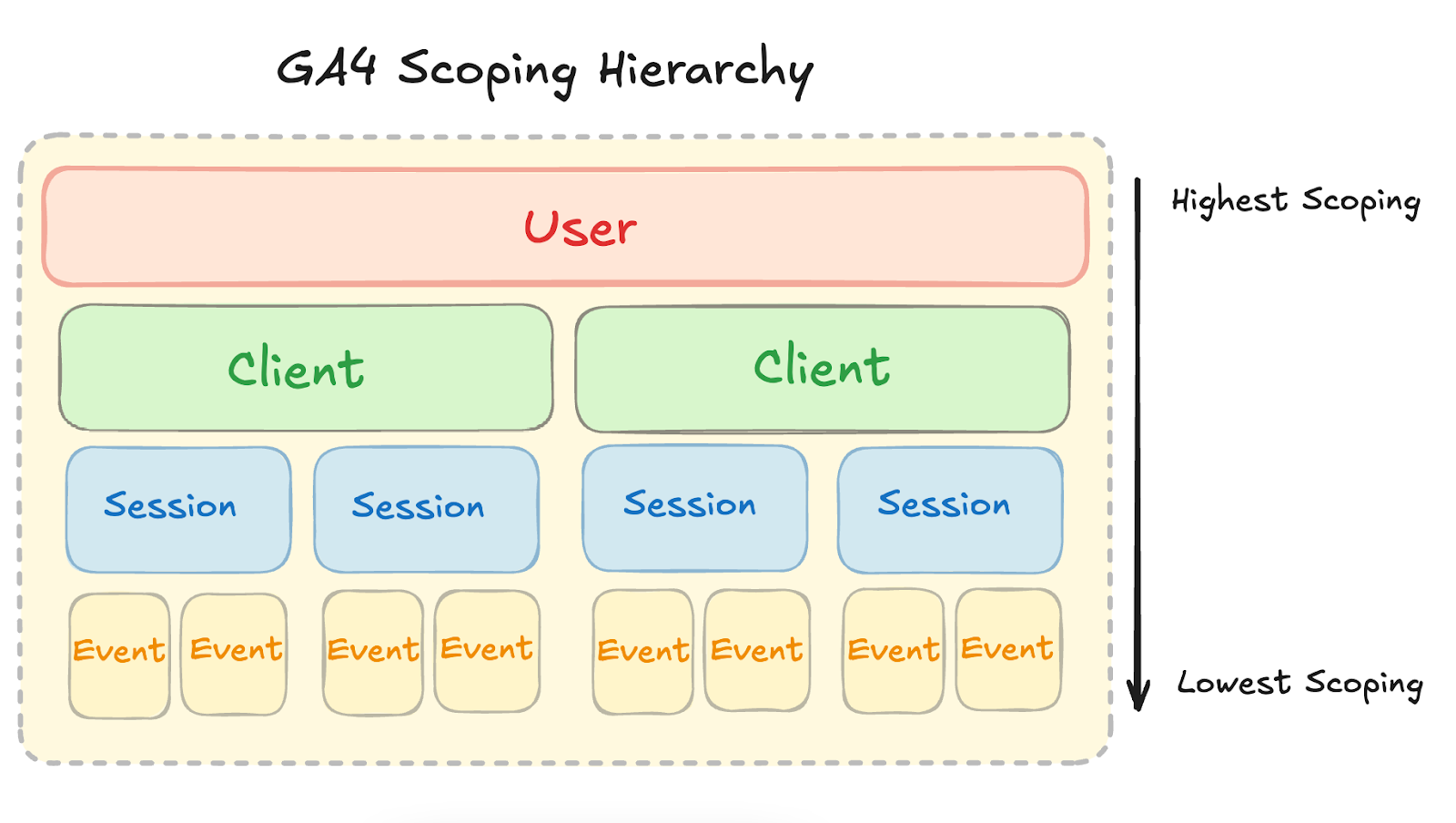
- User (
user_id): Data tied to a specific logged in user. - Client (
user_pseudo_id): Data tied to a specific browser-device pair. - Session: Data tied to a session or journey.
- Event: Data tied to a specific action (e.g., clicking a button).
Also if you work in eCommerce, there’s also Item Level Scoping.
- Item: Data tied to specific items, like products in an e-commerce transaction.
To report on the right numbers, you need to pick the right scope.
The fundamental rule when choosing scopes
If you are using a dimension at a particular scope, you must always use a metric that is either at that scoping level or at a lower level than that scope in the hierarchy.
Let’s break that down…
If you are using a User Scoped Dimension (user_id), you can use metrics from any scope as User Level scoping is the highest scoping level.

If you are working with a Client Scoped Dimension (user_pseudo_id), you must work with metrics that are at the same scoping level or less.
This means you should not use User scoped metrics (such as Users). You can, though, use Client Level, Session Level & Event Level scoped metrics.

If you are working with a Session Scoped Dimension (let’s say session medium), you can only work with Session Scoped or Event Scoped metrics.
This means that you can use Session or Event level metrics, but you couldn’t work with Client (user_pseudo_id) or User (user_id) Scoped metrics.

If you are working with an Event Scoped Dimension, you can only work with event based metrics. You cannot work with any other type of metric except for event scoped dimensions. Why does using the wrong scope break your numbers?

In the example below, we can see how a single user interacts with the site over the course of a day.
- User 1
- Session 1 - organic visit
- Session 2 - paid visit
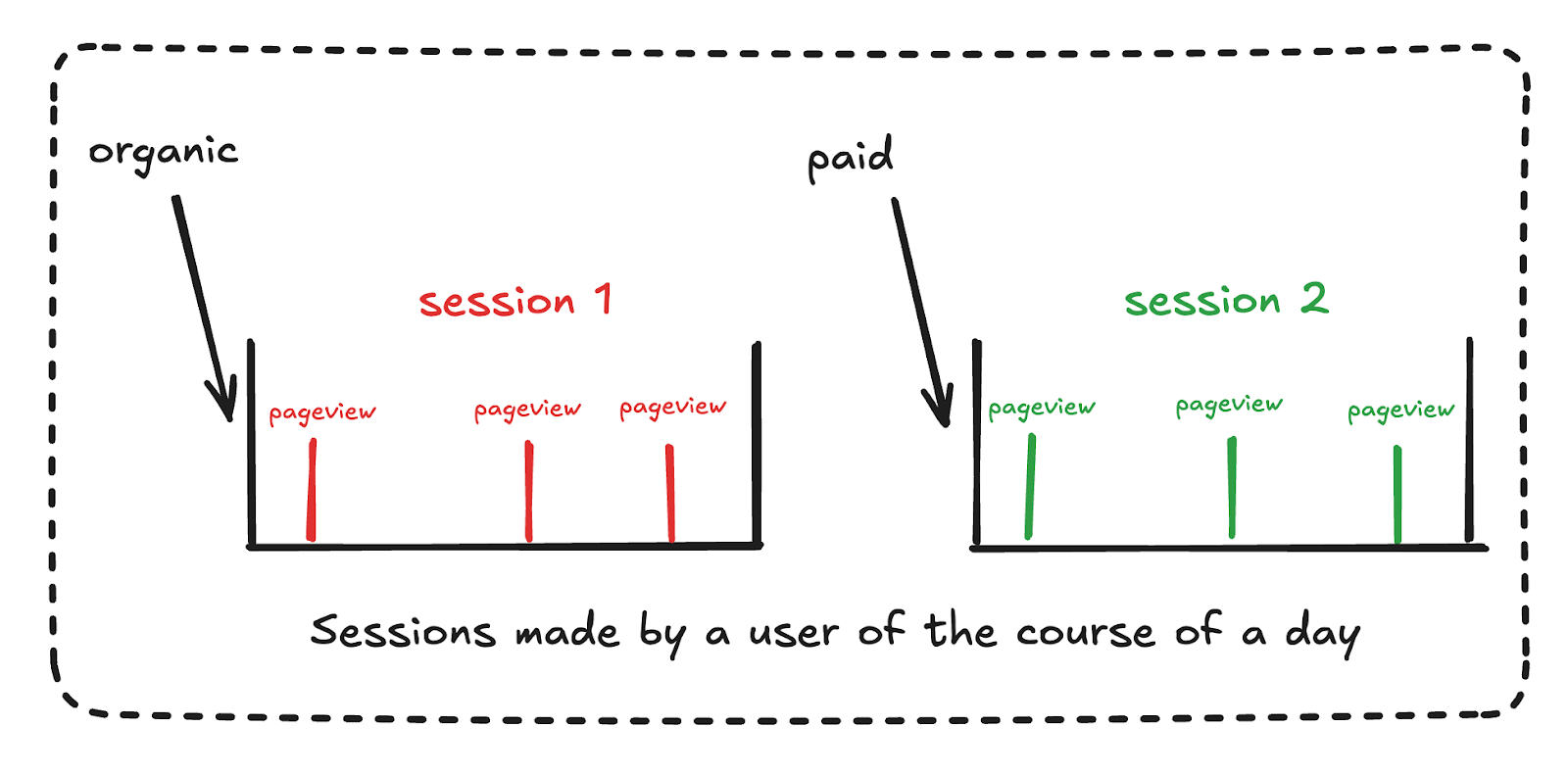
In this example, we can see there has been a single user, with 2 sessions.
With no dimensions, we have no issues.

That was nice and easy. Let’s make a problem.
We’ll add a session level dimension to our table with a user metric.
Now we’ve got double counting.
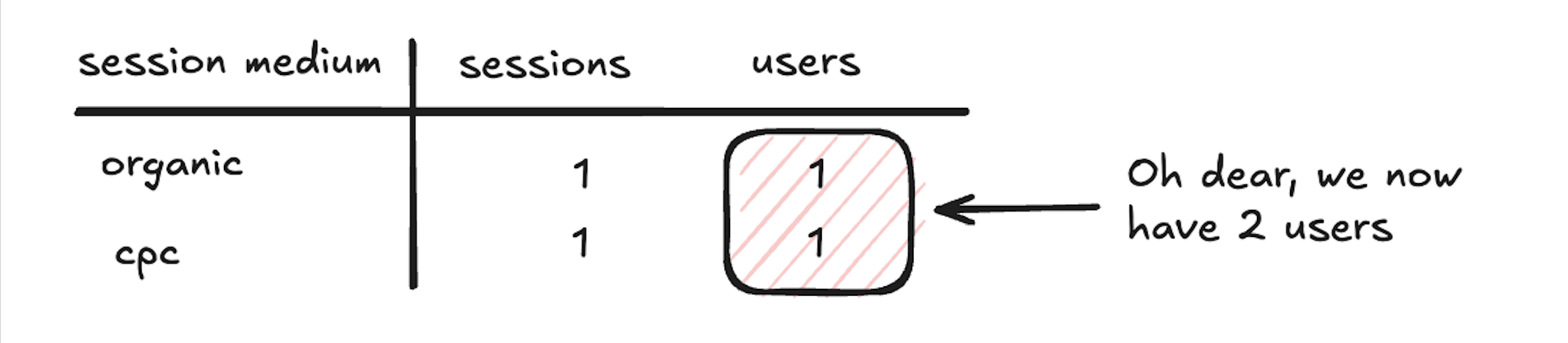
We double count our user because that user has 2 sessions, 1 via organic and 1 via cpc and we have a session level dimension.
There is technically 1 user in each of those buckets, but it’s the same one.
The error we’ve made is mixing a session level dimension with a client/user metric.
If we want to look with session medium alongside a user based metric (i.e Users) then we need to use a user based dimension as this is higher up the scoping hierarchy.
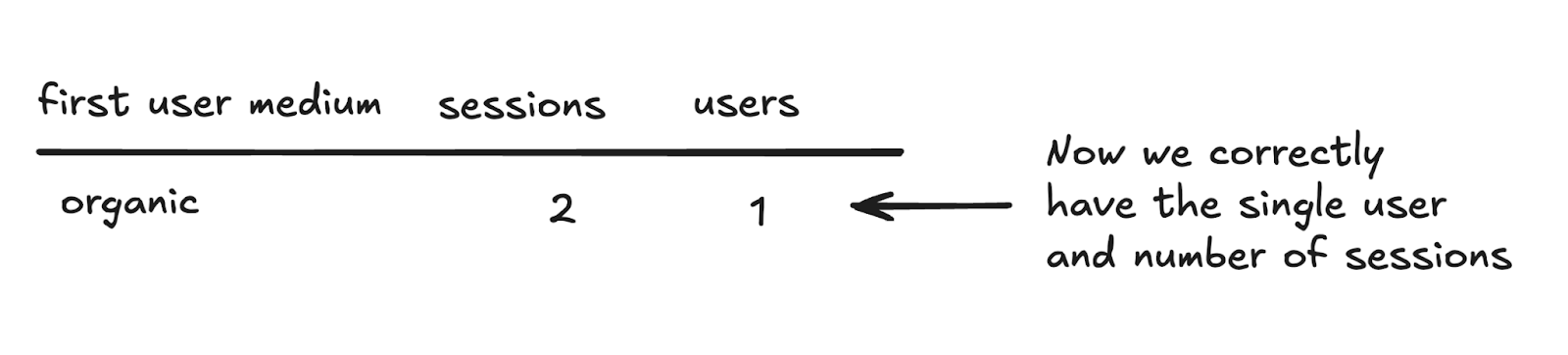
But then we miss out on exactly where each session came from. There is no right answer, just the different metrics for different moments.
Doesn’t GA4 mix together incompatible sessions & metrics though?
In short, yes.
This is particularly easy when using explorations where you can just select whatever metrics and dimensions you want.
Take these numbers below. We’re doubling counting all the users who have had multiple sessions.
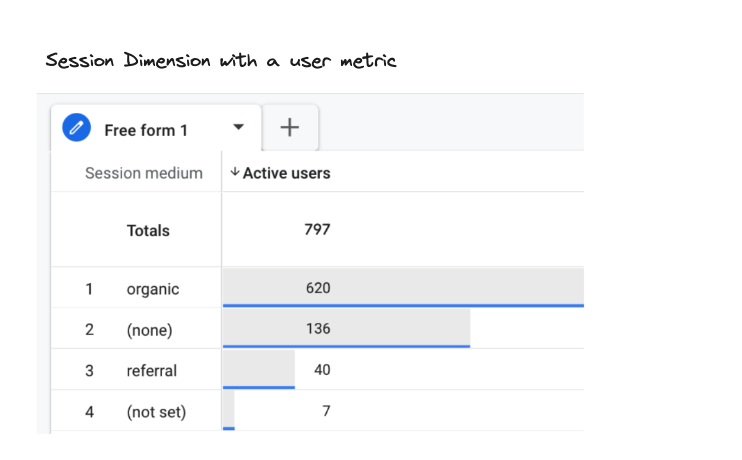
There are more guard rails on the GA4 interface such as separating the Session & First User Acquisition tables, but it’s still very possible.
If you used to use UA and you’re wondering about the old User Acquisition report? Yep it was wrong. We were double counting there and no-one noticed.
What do you need to be aware of when using our tables?
Are you just working with metrics?
If you are only generating metrics with no breakdowns, you can safely pick any of the tables that contain the metrics you want without any problems.
Do you want dimension breakdowns?
Pick one level of scope that you want dimensions for and pick that level of table.
Do you want session level dimensions? Pick the session table.
Do you want user level dimensions? Pick the user table.
Then don’t try to generate metrics from scopes that sit above the others.
The table below for a summary.