Contents
Understanding Tables
Types of Tables
We have several types of GA4 data, organized into three key categories:
Output Tables
- These are the primary tables you’ll use for analysis and reporting.
- These tables begin with
ga4_mrt.
Lookup Tables
- These tables let us map one value to another (e.g.,
Campaign1→campaign_1). - These tables begin with
ga4_lookup.
Staging Tables
- These are intermediary tables used to build the output tables.
- You’ll likely never need to interact with these directly.
- These tables begin with
ga4_baseorga4_stg.
Which table do I choose?
This depends on the scope of what you want to look at.
If you want to look at sessions use the session table.
If you want to look at Users, then use the Client/ User table.
Mixing dimensions & metrics from different scopes can cause double counting so it’s worth checking the GA4 scoping page to make sure you’re not doing that.
The most obvious thing to avoid is using session dimensions with user metrics.
The full list of tables can be found below:
Default Output Tables
These tables are included by default as they are automatically generated by GA4.
These tables are produced at the different GA4 scoping levels. |
| Table Name | Type | Default or Optional | What does it do? |
|---|---|---|---|
ga4_mrt_clients | output | Default | Client level data (i.e. device + browser) |
ga4_mrt_items | output | Default | Ecommerce item level data |
ga4_mrt_pages_daily | output | Default | Page level data (daily) |
ga4_mrt_pages_hourly | output | Default | Page level data (hourly) |
ga4_mrt_sessions | output | Default | Session level data. |
ga4_mrt_attribution | output | Optional | Attribution models for conversions |
ga4_mrt_users | output | Optional | User level data. (optional) |
Lookup Tables
| Table Name | Type | What does it do? |
|---|---|---|
ga4_lookup_base_country | lookup | A lookup file for country labels. |
ga4_lookup_seed_source_categories | lookup | A lookup file for channel definitions |
Staging Tables
| Table Name | Type | What does it do? |
|---|---|---|
ga4_stg_base_events | staging | Contains events and information about them. |
ga4_stg_event_purchase | staging | Contains the information about purchase events. |
ga4_stg_events | staging | Contains events and information about them. |
ga4_stg_page_engaged_time | staging | Contains engagement time information for unique pages/ sessions combinations. |
ga4_stg_page_entrance_exits | staging | Contains the keys for unique entrances and exits. |
ga4_stg_processed_sessions | staging | Contains unique Session Keys. |
ga4_stg_sessions_dimensions | staging | Contains dimensions for each unique Session. |
ga4_stg_sessions_dimensions_lndc | staging | Contains the Last Non Direct traffic source information for a session. |
ga4_stg_user_lndc_session_source | staging | Contains the Last Non Direct traffic source information for a User. |
ga4_stg_user_properties_store | staging | Contains the user level property information (i.e whether they match any of the user properties). |
FAQs
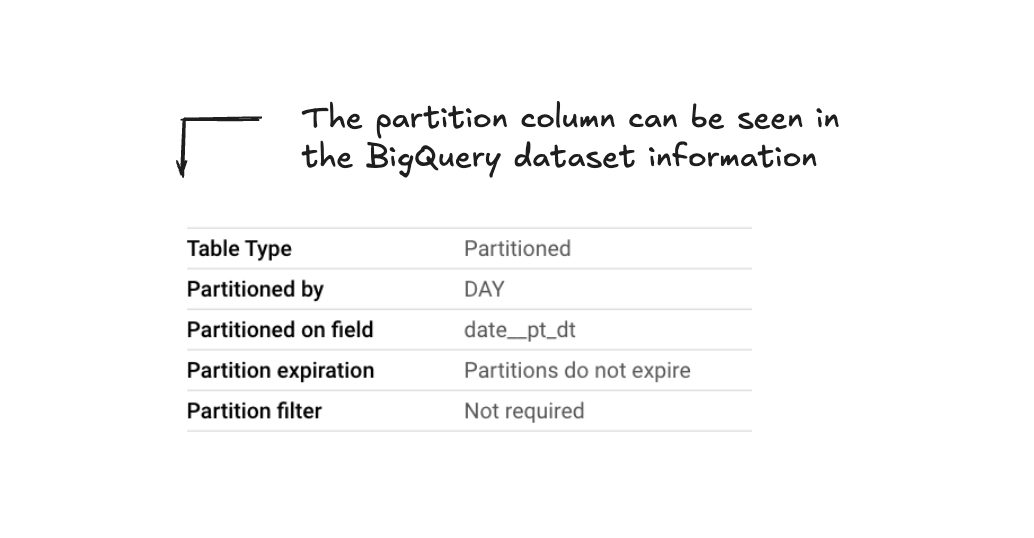
You will hear us refer to partition columns across the different Pipeline GA4 tables.
A partitioned table is split into smaller parts, or "partitions” which makes managing and querying the data faster (and more affordable).
In the Pipeline tables, the partitioned column is often date (date__pt_dt).
This is the best date column to use in the majority of cases.